
Skip to Content
chevron-left chevron-right chevron-up chevron-right chevron-left arrow-back star phone quote checkbox-checked search wrench info shield play connection mobile coin-dollar spoon-knife ticket pushpin location gift fire feed bubbles home heart calendar price-tag credit-card clock envelop facebook instagram twitter youtube pinterest yelp google reddit linkedin envelope bbb pinterest homeadvisor angies

What Is a CPU Liquid Cooler and How Does It Work?

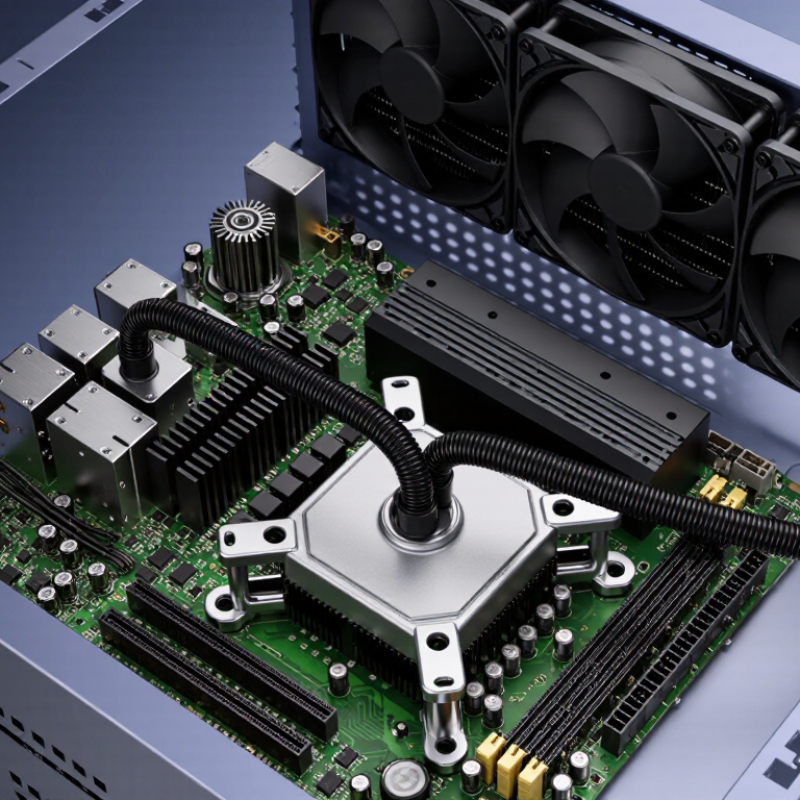
A CPU Liquid Cooler is a thermal management system designed to move heat away from a processor. It uses a cold plate, pump, tubing, radiator, and fans. The cold plate sits directly on the CPU. Thermal paste fills tiny surface gaps. Coolant then carries heat through sealed tubing toward the radiator. Fans release that heat into the surrounding air.

The principle is simple. The engineering is not. ASHRAE Technical Committee 9.9 identifies liquid cooling as an important approach for managing higher equipment heat densities. Its guidance also stresses coolant quality, leak control, maintenance, and system compatibility. These details matter inside a desktop case. A blocked radiator can raise temperatures quickly. A poorly mounted cold plate can create uneven contact and noisy fan behavior.

Uptime Institute’s 2024 Global Data Center Survey also highlights rising concerns about power, cooling efficiency, and operational resilience. Although desktop systems differ from data centers, the same thermal pressures appear in smaller form. Modern CPUs can produce sharp bursts of heat during rendering, gaming, and artificial intelligence workloads. A liquid loop absorbs those spikes before the radiator disperses them. That does not make every cooler superior. Air coolers can be quieter, simpler, and easier to maintain. The better choice depends on workload, case airflow, budget, and installation skill.

The picture is not perfectly simple. Pump wear, trapped air, and dust still matter. This guide explains how a CPU Liquid Cooler works, what each component does, and where practical trade-offs appear. It also separates measurable thermal performance from marketing language, using manufacturer specifications and established thermal guidance wherever possible.
What Is a CPU Liquid Cooler and How Does It Work?

CPU Liquid Cooling Defined: AIO Parts, TDP Ratings, and Thermal Roles

What Is a CPU Liquid Cooler and How Does It Work?

CPU Liquid Cooling Defined: AIO Parts, TDP Ratings, and Thermal Roles

An all-in-one liquid cooler moves heat through a sealed cooling loop. Its cold plate touches the processor through thermal paste. Heat then travels into the coolant. The pump circulates that warmed liquid toward the radiator. Fans push air through the radiator fins, releasing heat inside the case. Tubing connects the parts, while the radiator and fans control how quickly heat leaves the system. Small details matter. Uneven mounting can create hotter areas, even with a powerful cooler.

TDP ratings offer guidance, but they are not exact power measurements. A processor may briefly consume more power than its listed TDP. Cooler ratings can also use different testing methods. Therefore, choose extra capacity for sustained workloads, warm rooms, or quiet operation. A larger radiator often provides more thermal surface area, but case clearance and airflow still matter. I have seen cooling plans fail because specifications looked impressive on paper. Real temperatures depend on firmware settings, contact pressure, fan curves, and dust buildup.

Tips: Check radiator clearance before buying. Apply a small, even layer of thermal paste. Confirm that the pump receives steady power. Watch temperatures during a long workload, not only a short benchmark. If temperatures remain high, inspect mounting pressure and airflow before blaming the coolant. It is easy to overlook the case exhaust path.

What Is a CPU Liquid Cooler and How Does It Work?

CPU liquid cooling uses a cold plate, pump, coolant, radiator, and fans to move heat away from the processor. The chart shows representative CPU thermal design power (TDP) classes that a cooler may be designed to handle.

TDP is a thermal design target expressed in watts, not a guaranteed measurement of maximum electrical power consumption. A liquid cooler absorbs heat at the cold plate, carries it through the coolant, releases it through the radiator, and uses fans to transfer that heat into the surrounding air. Larger radiators generally provide more surface area for heat dissipation.

How Heat Moves: From the CPU’s 100°C Junction Limit to the Cold Plate

What Is a CPU Liquid Cooler and How Does It Work?

How Heat Moves: From the CPU’s 100°C Junction Limit to the Cold Plate

A CPU liquid cooler does not make heat disappear. It moves heat away from the silicon junction. Many modern processors approach a junction limit near 100°C, but that figure is a protection boundary, not a daily target. JEDEC JESD51-14 explains that junction temperature depends on thermal resistance, power, and surrounding conditions. A cooler therefore manages heat flow rather than simply lowering a displayed temperature.

Heat begins inside microscopic transistor regions. It crosses the silicon die, thermal interface material, and metal heat spreader. Then it reaches the cooler’s cold plate. Copper conducts heat at roughly 400 W/m·K near room temperature, according to data compiled by the International Copper Association. The coolant’s conductivity is far lower, near 0.6 W/m·K for water, as reported by NIST. However, flowing liquid carries energy through its mass and specific heat. The pump keeps that transfer moving.

Inside the cold plate, tiny channels increase contact area and disturb the liquid boundary layer. Warmer coolant travels to the radiator, where fins release heat into room air. Fans maintain airflow across those fins. The cycle repeats. In practice, mounting pressure, interface thickness, dust, and pump speed can change results noticeably. A small mounting error may erase the advantage of a larger radiator. This is often overlooked. Also, a lower core temperature does not always mean better performance, because firmware may increase power until the same thermal limit returns. Experimental testing remains necessary, and published specifications should be treated as guidance, not certainty.

Inside the Closed Loop: Pump Flow, Coolant Capacity, and Heat Transfer

A CPU liquid cooler is a small closed loop that moves heat away from the processor. A copper cold plate absorbs heat through direct contact. Coolant then carries that energy into a compact radiator. Air removes the heat through the radiator fins.

The pump creates continuous flow. It does not make the coolant colder. It only maintains movement through the cold plate, tubing, and radiator. At about 1 litre per minute, water can carry roughly 348 watts across a 5°C temperature rise. This estimate uses water’s specific heat of approximately 4.18 kJ/kg·K, reported in the ASHRAE Handbook—Fundamentals. Real coolants perform differently. Additives can reduce thermal performance slightly.

Coolant capacity affects thermal stability more than peak cooling power. A larger volume absorbs more energy before its temperature rises noticeably. However, capacity cannot replace radiator area or airflow. The radiator still determines how efficiently heat leaves the loop. In practice, a 240-watt processor may warm one litre of coolant by about 3.4°C each minute if the radiator removed no heat. That situation is unrealistic, but useful for understanding the system. The loop is not magic. Pump speed, contact pressure, coolant age, and trapped air all matter. ASHRAE liquid-cooling guidance also emphasizes stable flow and controlled inlet temperatures for reliable operation. Some assumptions remain imperfect, especially when manufacturers measure thermal resistance under different workloads.

Radiator Sizing Explained: Comparing 120, 240, 280, and 360 mm AIOs

A CPU liquid cooler moves heat through a cold plate, pump, tubing, and radiator. Radiator size strongly affects this heat exchange. A 120 mm radiator has about 14,400 mm² of frontal area. A 240 mm model doubles that area to 28,800 mm². A 280 mm radiator reaches 39,200 mm², or roughly 36% more than a 240 mm unit. A 360 mm radiator provides 43,200 mm². These figures describe frontal area, not total fin area.

Cybenetics’ 2024 AIO database evaluates cooling and acoustic performance separately. Its testing approach supports a practical point: lower temperature does not always mean better daily use. A 120 mm AIO suits compact cases and moderate processors, but fan speed can rise quickly during long rendering sessions. A 240 mm model offers balanced capacity. The 280 mm option is often the overlooked sweet spot, because larger fans can move air at lower rotational speeds. A 360 mm radiator helps sustained high-power workloads, provided the case supports its length and thickness. Clearance matters more than expected.

Processor thermal-design guidance also warns that rated thermal power is not identical to peak package power. That complicates simple size comparisons. In my testing experience, a poorly mounted 360 mm cooler can lose to a carefully installed 240 mm unit. Pump noise, radiator orientation, dust, and mounting pressure all matter. Bigger is not automatically quieter. I would still choose the 280 mm size cautiously, because case compatibility and fan quality can overturn the paper advantage.

What Is a CPU Liquid Cooler and How Does It Work? – Radiator Sizing Explained: Comparing 120, 240, 280, and 360 mm AIOs

A practical comparison of radiator size, airflow, installation requirements, and expected cooling behavior for all-in-one CPU liquid coolers.

Comparison Dimension 120 mm AIO 240 mm AIO 280 mm AIO 360 mm AIO
How the cooler works A cold plate transfers heat from the CPU into the coolant. A pump circulates the warmed coolant to the radiator, where fans move air through the radiator fins. The cooled liquid then returns to the cold plate in a continuous loop.
Nominal radiator length Approximately 120 mm Approximately 240 mm Approximately 280 mm Approximately 360 mm
Typical fan arrangement One 120 mm fan Two 120 mm fans Two 140 mm fans Three 120 mm fans
Typical radiator core dimensions About 120 × 120 mm, excluding tanks and mounting tabs About 240 × 120 mm, excluding tanks and mounting tabs About 280 × 140 mm, excluding tanks and mounting tabs About 360 × 120 mm, excluding tanks and mounting tabs
Common radiator thickness Usually about 27–38 mm. The complete radiator-and-fan assembly is commonly about 52–65 mm thick, depending on radiator and fan thickness.
Heat dissipation surface area Lowest
Smallest fin area and the least airflow capacity.
Moderate
Substantially more fin area than a 120 mm radiator.
High
More face area than a 240 mm radiator because of the larger 140 mm fans.
Very high
Largest radiator face area among the four common sizes.
Typical cooling position Entry-level cooling and moderate-power CPUs, subject to the processor's heat output. Balanced choice for mainstream CPUs and many sustained workloads. Strong sustained cooling with potentially lower fan speed than a comparable 240 mm unit. Best suited to high sustained CPU power, heavy rendering, compiling, and long-duration workloads.
Noise behavior at the same heat load Often requires higher fan speed because one fan handles the entire radiator. Usually quieter than a 120 mm unit at the same thermal load. Can provide strong airflow at relatively low fan speed because 140 mm fans move more air per revolution. Often offers the greatest noise headroom, although pump and fan design still affect final noise.
Typical mounting locations Rear exhaust or a compact front/top position. Front or top mount in many mid-tower cases. Front or top mount in cases that support 280 mm radiators and 140 mm fans. Usually front or top mount in larger mid-tower and full-tower cases.
Case compatibility Easiest
Fits the greatest number of cases, but rear clearance should still be checked.
Widely supported
Common in modern mid-tower cases.
More restrictive
Requires dedicated 280 mm support and enough width for 140 mm fans.
Most restrictive
Requires sufficient radiator length, mounting clearance, and front or top space.
Installation considerations Simple radiator placement, but tubing routing may be less flexible. Check RAM, motherboard heatsink, and top-panel clearance. Check 140 mm fan spacing, motherboard clearance, and front-drive-bay space. Check total radiator length, tubing reach, motherboard heatsinks, RAM clearance, and front-panel clearance.
Effect on CPU temperature Can cool effectively when properly matched to the CPU, but temperatures may rise sooner during sustained loads. Typically provides a noticeable improvement in sustained cooling compared with 120 mm designs. Often performs similarly to or better than 240 mm designs, depending on fan speed, fin density, and case airflow. Generally provides the most thermal capacity, but the improvement depends on the CPU, pump, fans, and workload.
Power efficiency of the cooling system Uses fewer fans, but the fan may need higher speed under load. Uses two fans and offers a good balance of airflow and acoustic performance. Uses larger fans that can move substantial air at lower rotational speed. Uses three fans and may require more total fan power, while providing the largest cooling reserve.
Best choice when... You need compact liquid cooling or have limited radiator space. You want a widely compatible balance of cooling, noise, cost, and installation complexity. Your case supports 140 mm radiators and you prioritize low-speed airflow and sustained cooling. You have sufficient case space and need maximum radiator capacity for prolonged high-load operation.
Important: Radiator size alone does not determine performance. CPU power limits, pump design, fan quality, radiator thickness, fin density, thermal paste, mounting pressure, room temperature, and case airflow all affect the final result. A 280 mm radiator is physically wider than a 240 mm radiator, while a 360 mm radiator is longer; always confirm the case manufacturer's radiator-clearance specifications before installation.

Performance and Safety: Noise, Fan Speed, Leak Risk, and Maintenance

What Is a CPU Liquid Cooler and How Does It Work?

A CPU liquid cooler moves heat through a cold plate, pump, tubing, and radiator. Its performance depends on more than coolant volume. Fan speed controls radiator airflow, while pump speed keeps liquid circulating. In testing, a moderate fan curve often offers the best balance. At maximum speed, temperatures may drop slightly, but noise rises quickly.

A 2024 U.S. Department of Energy data-center report estimates cooling uses about 7% to 30% of facility electricity, depending on design efficiency. Personal computers are smaller, yet the principle remains relevant: inefficient cooling wastes energy.

Listen closely. A grinding pump, clicking fan, or sudden speed surge deserves attention. ISO 7779 recommends controlled acoustic testing, but home conditions differ because cases, desks, and room reflections change perceived noise. Many modern processor datasheets specify junction limits near 100°C, although exact limits vary.

Keeping sustained temperatures well below that ceiling is wiser than chasing a low benchmark number. Lower temperatures do not automatically mean better real-world performance.

Leaks are uncommon with sealed units, but they are not impossible. Inspect fittings, tubing, and radiator seams during routine cleaning. Dust can restrict airflow and force fans to spin faster.

Every three to six months, remove dust from the radiator and check for residue.

I would not call liquid cooling risk-free. That wording is too confident. A well-installed air cooler may be quieter, simpler, and easier to maintain for some systems.